

Group Owners, Managers, and Moderators #
A group must have someone to administer and take responsibility for it
As an owner, you can manage all aspects of the group and its content. You can’t leave this group. To be able to leave, you need to transfer ownership to another user first.
As a manager, you can manage the group members and edit or delete all posts and comments in this group.
As a community administrator, you have the same control as the group owner.
As a moderator, you can edit or delete all posts and comments in this group.
As a community administrator, you have the same control as the group owner.
Transfer Ownership, Turn Into Manager or Moderator #
Transferring group ownership and escalating privileges of the group member is very easy as selecting a user from the group member list and choosing the desired option from the cog configuration option.
Follow these steps to access these options:
- Go to your group
- Select the Members tab
- You will see a list of members for that group, and the “Manage” button for each user (except the owner)
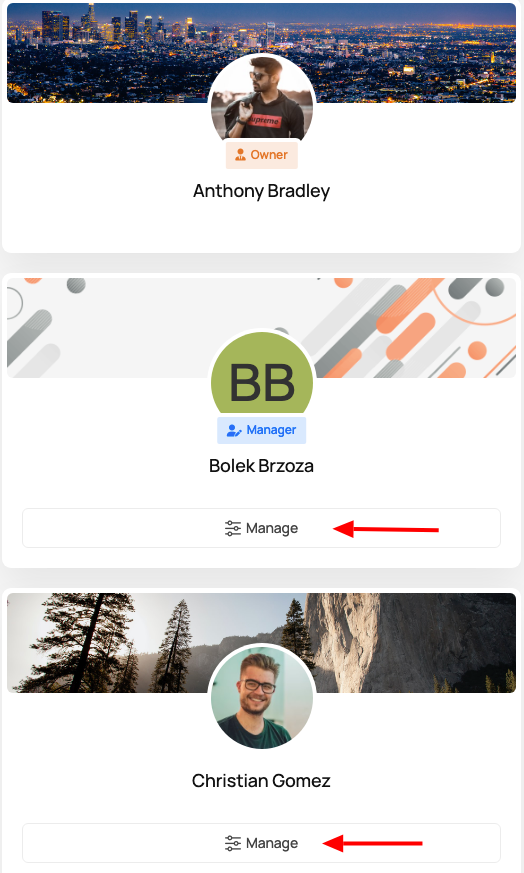
Click it and select the appropriate option:
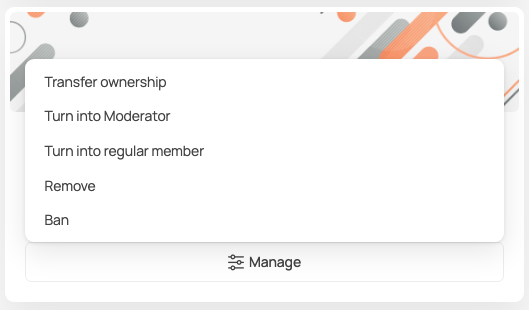
Remove and Ban User #
Following the above steps, you can also remove or ban a user from the group.
Unban User #
With the introduction of user roles filtering, group owners and managers can easily unban users and they can return to being valuable group members.
Follow these steps to unban banned user:
- Go to your group
- Select Members tab
- Switch to “Banned” tab
- You will see a list of all members that were struck with ban hammer.
- Click “Unban” and confirm


