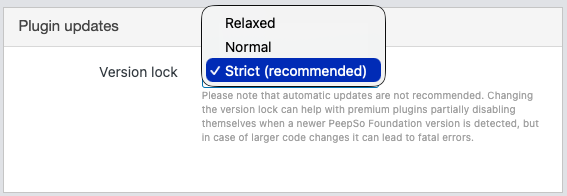
Please note that we do not recommend using automatic updates for PeepSo plugins. This may result in a “version incompatibility” error.
It’s advised to update all PeepSo plugins (and a theme) via WP-Admin > Dashboard > Updates only when new versions are available for all of them.
Changing the version lock can help with premium plugins partially disabling themselves when a newer PeepSo Foundation version is detected, but in case of larger code changes, it can lead to fatal errors.
To mitigate potential issues, we recommend setting the version lock to “Strict”.
You can try “Normal,” for example, if you use auto updates (not recommended), or if there is a delay in detecting all available updates.
“Relaxed” can be used as a kind of temporary solution in case of a version incompatibility issue after updating.