

PeepSo has always been about helping you build more than just a website. It is about creating a living, breathing community where members come back, participate, share, react, connect, and feel like they belong. With this release, we are taking a major step forward by introducing one of the most exciting additions to the PeepSo ecosystem yet: PeepSo Stories. That’s right.
Stories have become one of the most natural ways people share online. They are fast, visual, temporary, personal, and incredibly easy to engage with. They invite people to share the little moments that may not need a full post but still deserve attention. A quick photo, a short video, a behind-the-scenes update, an event reminder, a product preview, a personal milestone, a community announcement. All of these now have a perfect home inside your PeepSo-powered community.
Introducing the New PeepSo Stories Plugin
The star of this release is the brand-new PeepSo Stories plugin. This is not just a small extra feature. It is a completely new way for your members to express themselves and for your community to feel more active, modern, and alive. PeepSo Stories brings a familiar, full-screen, visual storytelling experience directly into your WordPress community, giving your users a social feature they already understand while keeping everything under your own brand, on your own website, and inside your own community.
With PeepSo Stories, members can create multi-slide stories with up to 10 slides per story, with the limit configurable by the site admin. Stories can include images, videos, and optional links, making them useful for everything from casual sharing to creator updates, course communities, membership sites, product communities, niche social networks, and even commerce-driven communities. Whether someone wants to share a photo, a short clip, a quick announcement, or a “Shop now” style call to action, Stories make that experience immediate and engaging.
Story creation has been designed to feel simple and natural. Users can click to upload media or drag and drop files into the upload modal. A preview grid lets them review their selected content before publishing, so creating a polished story does not feel complicated or technical. Image support includes JPEG, PNG, GIF, and WebP, with configurable options and a default maximum file size of 8 MB per image. Video support is also configurable and includes MP4 and WebM, with a configurable maximum upload size and a default of 100 MB.
One of the most powerful parts of PeepSo Stories is the optional link attachment. Each story can include a custom URL and custom link text, such as “Shop now,” “Read more,” “Join the event,” “Watch the replay,” or “Learn more.” This opens up a lot of possibilities for community owners. Stories can now drive attention to events, products, lessons, offers, blog posts, campaigns, fundraisers, or anything else that matters to your community.
A Beautiful Full-Screen Viewing Experience
PeepSo Stories includes a modern full-screen lightbox viewer that makes browsing stories feel smooth, familiar, and immersive. Members can move through slides with auto-advancing progress bars, pause and play stories when they want more time, and use tap zones to move between slides. When video stories are enabled, users also get audio mute and unmute controls, so they stay in control of their viewing experience.
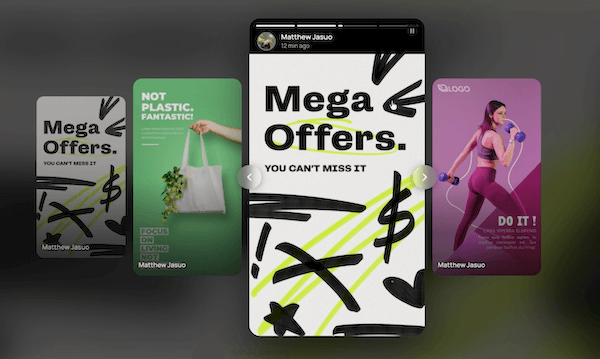
The viewer keeps the social context front and center. Each story displays the author’s avatar, name, and timestamp, so the experience still feels personal and connected to the community. Members can also navigate between stories using previous and next story arrows, making it easy to move from one person’s update to the next without leaving the full-screen experience.
This is the kind of feature that can make a community feel instantly more alive. Instead of only seeing static feeds and longer posts, members now get a visual layer of fresh, time-sensitive updates. It encourages quick sharing, quick viewing, and repeated visits. Stories give people a reason to check in again, because what is visible today may not be visible tomorrow.
Flexible Display Templates for Every Community Style
Every PeepSo community is different, so PeepSo Stories includes multiple carousel display templates to help stories fit naturally into your site design. The default bubbles / circles layout gives your community the classic social story experience users already recognize. The minimal bubbles layout offers a cleaner, lighter presentation for communities that prefer a more understated design. The cards / rectangles layout gives stories a stronger visual presence and can work beautifully for more content-heavy, professional, creator, or commerce-focused communities.
PeepSo Stories also supports both blocks and shortcodes, giving site owners the flexibility to place stories wherever they make the most sense. Add them to a community homepage, activity page, custom landing page, sidebar, member area, or any other layout you are building. This makes Stories easy to integrate into existing sites while also giving designers and site owners room to create something unique.

Control, Moderation, and Community Safety
A feature like Stories should be exciting, but it also needs proper control. PeepSo Stories includes publishing permissions based on WordPress roles, so admins can decide exactly who is allowed to create stories. You can open story publishing to all members, limit it to specific roles, or use it as a premium community feature depending on how your site is structured.
Admins can also configure daily story limits per user, with the default set to 5 stories per day. This helps keep the experience active without letting it become overwhelming. Stories also include automatic expiry, with the default lifetime set to 24 hours. Expired stories are cleaned up hourly through WP Cron, helping the community stay fresh and keeping temporary content from piling up forever.
For communities that need more oversight, PeepSo Stories includes an optional moderation and approval workflow. When enabled, stories go into pending status until an admin approves them. Admins can bulk approve pending stories, bulk delete stories, and remove or edit individual stories. This makes Stories flexible enough for casual communities, private networks, professional communities, schools, brands, membership sites, and other environments where moderation matters.
PeepSo Stories also integrates with PeepSo’s notification system, so users can be notified when their submitted stories are approved or rejected. That small detail matters because it keeps the publishing process clear and helps members understand what is happening with their content.
How to Install PeepSo Stories Plugin
Stories plugin should appear in the backend of your site > PeepSo > Installer. If it’s not there, please give it up to 24h. You can always download the files manually from your account. Stories plugin is available out of the box to all PeepSo Ultimate Bundle. If you don’t have a PeepSo Ultimate Bundle, you can get it here. If you are a PeepSo Community Bundle Subscriber, you can always upgrade your existing license. See upgrade options in your account or contact our support for help.
A New Dashboard Built for Smarter Community Management
This release is not only about Stories. We have also made major improvements to the PeepSo dashboard, giving community owners much better visibility into what is happening across their site. A great community is not just built by adding features. It is built by understanding your members, spotting patterns, identifying what works, and knowing where attention is needed. The new dashboard improvements are designed to help with exactly that.
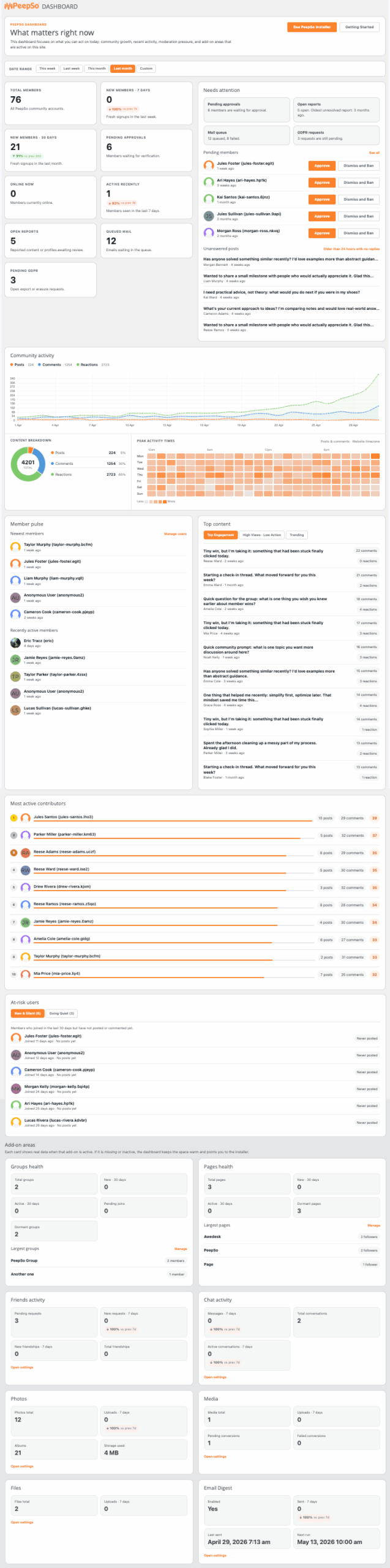
The dashboard now includes a new date range selector, making it much easier to filter analytics and understand activity across different periods. Instead of looking at disconnected numbers, admins can now get a clearer view of how their community is performing over time. This is especially useful when reviewing the impact of campaigns, events, new content, product launches, membership drives, or community engagement efforts.
The new Community Activity panel introduces a line chart that gives a cleaner and more useful view of activity trends. The previous Community Activity widget panel has been removed and replaced with a more visual, more practical analytics experience. There is also a new Community Breakdown panel with a donut chart, helping admins understand the composition of activity across the community at a glance.
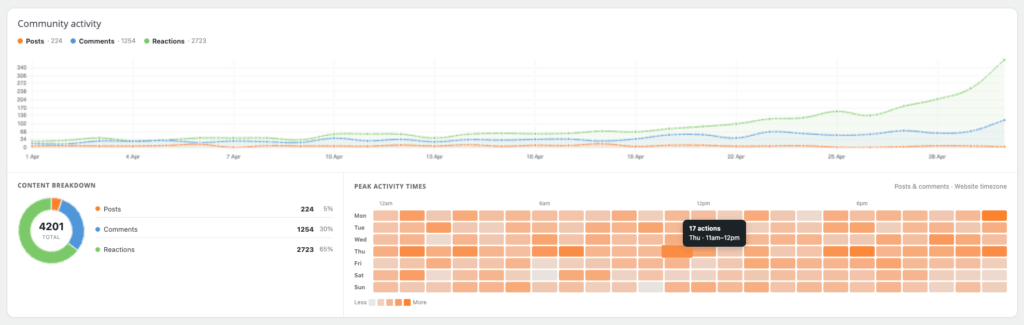
One of the most exciting new additions is the activity heatmap. This shows peak activity times, helping community owners understand when members are most active. That can be incredibly useful when planning announcements, publishing content, scheduling events, sending emails, moderating activity, or timing community prompts. Knowing when your members are actually present can make every community management decision smarter.
Better Insights Into Content and Members
The new dashboard also includes improved content and member insights. The new Top Content panels highlight High Views – Low Actions posts and Trending Posts, giving admins a better understanding of what is getting attention and what is actually driving engagement. A post with lots of views but low interaction may need a better call to action. A trending post may reveal a topic your members care about deeply. These insights help community owners move from guessing to acting.
The new Most Active Contributors panel helps identify the people who are helping keep the community alive. These are the members who post, comment, react, participate, and create momentum. Recognizing these users can be incredibly valuable, whether you want to reward them, invite them into ambassador programs, feature them, or simply understand who your strongest community voices are.
We have also added new user health insights, including At-Risk Users, New but Silent Users, and New Going Quiet Users. These panels are designed to help community owners spot early warning signs. A new member who joins but never participates may need a welcome message, a prompt, or a clearer onboarding path. A once-active member who is going quiet may need re-engagement before they disappear completely. These are the kinds of insights that can help admins build healthier, more intentional communities.
Together, these dashboard updates make PeepSo feel more powerful not just for members, but for the people running the community. You get more than activity. You get signals. You get patterns. You get a better sense of where the energy is, where it is fading, and where your attention can make the biggest difference.
User Limits and AweCommerce Readiness
This release also includes important updates to User Limits as part of our ongoing preparation for something much bigger: AweCommerce.
We are not ready to reveal everything just yet, but we are very excited about what is coming. The work happening here is part of a larger vision for bringing stronger commerce possibilities into the PeepSo ecosystem. Communities and commerce naturally belong together. Creators, membership site owners, educators, clubs, coaches, marketplace builders, brands, and niche community owners all need better ways to connect engagement with real business opportunities.
Additional Improvements
Alongside PeepSo Stories, the new dashboard metrics, and the groundwork for AweCommerce, this release includes several smaller but meaningful improvements across PeepSo and its plugins.
We made a small language update in PeepSo, improved SuperQ, improved chat reply behavior so the message input clears immediately after sending, improved tag handling in anonymous posts, and improved widget data updating. These may not be headline features, but they are part of the ongoing polish that makes daily community use feel smoother and more reliable.
Fixes and Polish
This release also includes a solid round of fixes across the platform. We fixed invalid and inconsistent reaction counts in Dashboard Top Content posts, improved dashboard count accuracy, resolved an issue with incorrect pending member counts when orphaned records exist in the PeepSo users table, and addressed a MySQL 8.0+ compatibility issue in the PeepSo dashboard.
We also fixed missing translations, reaction translation issues, notification loading when translation arguments are empty, and character escaping issues in the email template editor. Additional fixes include timestamp handling for WP Job Manager activity posts, missing timestamps on page post search results, the missing “Powered by PeepSo” text in the new postbox, and an issue where blocked users’ content could still appear in widgets.

PeepSo Power Suite
Update PeepSo and Start Sharing Stories
This is a big release, and PeepSo Stories is a major new chapter for the PeepSo ecosystem.
Stories make your community more visual, more immediate, and more exciting. They give members a new reason to participate, a new way to express themselves, and a new habit that can bring them back again and again. Combined with the new dashboard metrics, deeper community insights, better activity tracking, and the first hints of what is coming with AweCommerce, this release is about momentum.
We are building PeepSo to help your community feel alive today and become even more powerful tomorrow.
Update PeepSo, install the new PeepSo Stories plugin, and give your members a fresh new way to share what matters. See the full changelog here.
How to Update
Best practices are called that for a reason and those are for any WordPress plugin, not just PeepSo. Make sure you backup your website. Test updates on a staging site first.
Go to the backend of your site > Dashboard > Updates. Make sure all PeepSo plugins show there available for update. If they don’t all show. Wait. If you can’t wait, you can always download the zip files from under your account here and upload them manually via: backend > Plugins > Add New > upload package > When prompted, replace the old files with new version.
When in doubt, please don’t hesitate to contact us.
Make Your Community Mobile
PeepSo now offers a seamless solution to transform your PeepSo-based community into a powerful mobile app. No third-party integrations needed.
Everything you need to create, manage, and grow your mobile community is built directly by us for You and Your Community. Imagine the unlimited access to Your Community in the palm of your hand.





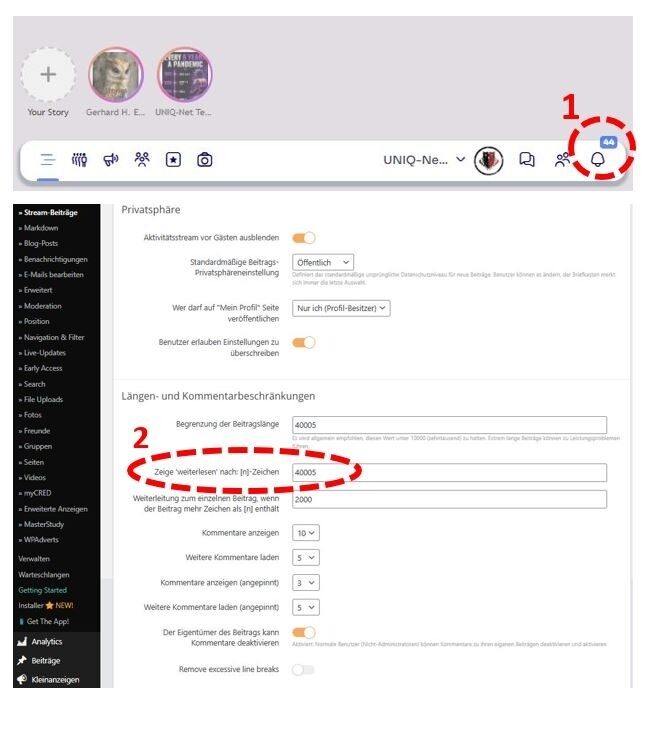



I need to increase the length and comment limits of the timeline, as members have already started complaining that they cannot read the timeline texts in full.
I had to increase the “Show read more after…” setting from 2,000 characters to the full length of the texts, so that at least this works properly.
If you would like to look into this problem, you only need to set the text length back to 2,000 characters.
Please help: Password and login details are located in the “Private note” section.