

Directories are one of the most valuable things you can put on a website. A member directory. A partner list. A venue guide. A list of certified installers, approved suppliers, local businesses, clinics, schools, studios. People arrive looking for someone specific, and if your site is the place that helps them find it, your site becomes the place they come back to.
So why do directory projects go wrong so often?
Because the plugin runs out of room. It’s great for the first fifty listings. Then you need a field it doesn’t have, so you bolt one on. You need submissions from your visitors, so you add a form plugin. The form plugin doesn’t talk to the directory, so you need to copy entries across by hand. You need reviews, so that’s another plugin. You need moderation that is not there yet. Two years later your directory is 17 plugins, a custom template, and no one understands how it all fits together 😁
Awedirectory is the whole thing, in one plugin.
Directories, listings, reviews, custom fields, ratings, taxonomies, search and filtering, maps, front-end submission, front-end editing, moderation queues, content reporting, email notifications, an on-site notification inbox, a user dashboard, and eight Gutenberg blocks to put it all on your pages. Not eight plugins that almost cooperate. One plugin, where every part already knows about every other part and it immediately looks familiar and intuitive, because it is built like WordPress. No custom launchers and “command center” interfaces.
Awedirectory is built entirely on native admin screens. Native list tables that work exactly like your Posts screen. Native settings pages. Native media handling. Real Gutenberg blocks. Nothing to learn that you don’t already know.
And it does something none of the big directory plugins do, which we’ll get to in a moment.
What it actually solves
You stop stitching plugins together. Fields, submissions, reviews, ratings, moderation, notifications and display are one system. One place to configure, one place to manage, one plugin to update while your visitors do the work. People submit their own listings from the front end and edit them later from their own dashboard. A directory that people maintain themselves is the only kind that stays accurate.
Nothing goes public that you didn’t approve, or it can, if you wish. Every listing and every review passes through moderation on your terms, and the rules are enforced in the plugin.
Awedirectory fits into your theme and won’t break its layouts. You get an extra benefit if you use PeepSo Block Theme (more on that later)
It stays fast as it grows. Awedirectory was built to handle thousands of listings with filters, sorting and search running on top of them, and it was designed that way from the first line rather than patched into it later.
Built for multisite networks. Awesome on a single site too
Here’s the part that makes awedirectory different from everything else on the market.
Every other serious directory plugin is a single-site plugin. Some are excellent single-site plugins. But they were all designed for one website, with one set of listings, one administrator, and one idea of who’s allowed to do what. Put one on a WordPress multisite network and the best you get is – it activates without errors.
Awedirectory was designed for networks first.
Awedirectory is not adapted to multisite, not just “multisite compatible”.
It is designed, from the beginning, for the situation where you have one WordPress installation and many sites that share a brand, share standards, and increasingly want to share a directory.
If that’s you, a franchise with regional sites, an association with chapter sites, a university with a site per department, a media group with a site per city, a community platform where every group gets its own space… awedirectory does something no other directory plugin can do..
And if you run a single site? Nothing about that is a compromise.
This is the part people get nervous about, so let’s be direct. Building for networks first didn’t make awedirectory heavier, slower or more complicated on a single site. If anything, It made it stricter and leaner about permissions, about what visitors can see, about validating what gets submitted, and strict is exactly what you want from the system holding your public-facing data.
On a single site, the network concepts still apply on a smallest possible network, which is just one site. Information about which site owns what, quietly resolve to your one site. Admin screens don’t show the network-related options as they are irrelevant at this very moment. You get the directory platform without the network paperwork, and if you ever do grow into a network, you don’t migrate anything. You just start sharing.
Multisite: one directory, many sites, no copies
The rule behind awedirectory’s network features fits in one line: The origin site owns the data.
The site that created a directory owns it. Owns the fields, the taxonomies, the review settings, the rules about what gets published. Always. That never shifts, never gets diluted, and never gets handed over by accident.
Here’s what that gets you.
Share a directory instead of duplicating it. Head office creates the Partners directory. Regional sites display it. There is one set of partners, not eleven near-identical copies drifting apart. When a partner updates their logo, it updates everywhere, because there was only ever one of them. Ask how many partners you have and there’s exactly one answer.
No manual syncing. Nothing to break. A shared directory doesn’t get copied, mirrored, imported or pushed to the other sites. It’s simply available to them. There’s no sync job to fail overnight and no “the regional site is showing last week’s data” ticket, because there’s no last week’s data.
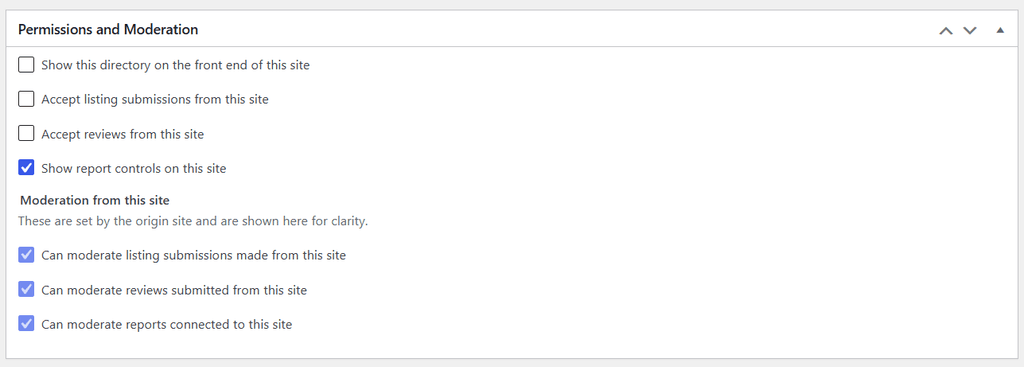
Nothing appears anywhere uninvited. Sharing a directory with a network doesn’t put it on participating site. The participating site’s own administrator has to accept it, then switch on display, and then separately decide whether their visitors can submit listings and whether they can post reviews. Three switches, genuinely independent. One regional site can be a read-only showcase. Another can take listing submissions but not reviews. A third can take both. All valid, all deliberate.
Local sites get local URLs. Head office shows the directory at /directory/partners/. The French site shows the same directory at /annuaire/partners/. Same listings, same moderation, local language.
You can share the work without sharing control. Give a regional site, or specific people on it, the authority to help moderate, approve listings, handle reports, publish and unpublish. That authority has limits, can be assigned and revoked. A regional administrator who helps you moderate still can’t rename your fields, reorganise your categories, or overrule you on whether something is published.
That last point is the most important. Being an administrator of one site in the network grants you exactly nothing over another site’s directory. Not because we hid the buttons, but because the plugin checks genuine authority before it does anything, every time, on every action.
And submissions remember where they came from. When a visitor on the regional site submits a listing, the listing belongs to the directory’s owner, and it’s recorded as having arrived from that regional site. Useful when you want to know which sites are actually driving contributions, and essential when somebody asks where a record came from.
Single site: All from multisite, minus the network
Run awedirectory on one WordPress site and you get the complete product.
Multiple directories, each with its own fields, its own taxonomies, and its own review settings. A Restaurants directory and a Partners directory on the same site never share a field or a taxonomy, no cross-contaminated dropdowns, no “my partner list offer the cuisine filter”.
Front-end submission, front-end editing, the user dashboard, ratings, reviews, reporting, moderation queues, maps, email notifications, the on-site notification inbox, all eight blocks, clean URLs, the PeepSo Block Theme integration. All of it.
The interface adapts. Screens that would show which site owns what, or which site a listing came from, don’t show. Sharing and participation settings stay out of your way. Awedirectory doesn’t spend your attention on concepts you don’t have.
What you keep from the network-first design is the discipline: content that isn’t approved can’t appear publicly, submissions are validated on the server, permissions are checked in the handler and not just reflected in the interface, and private records can’t leak through a URL. On a single site, that reads as a plugin that’s simply careful with your data.


(Some of) The features
Custom fields
Every directory defines its own fields, and setting them up takes minutes.
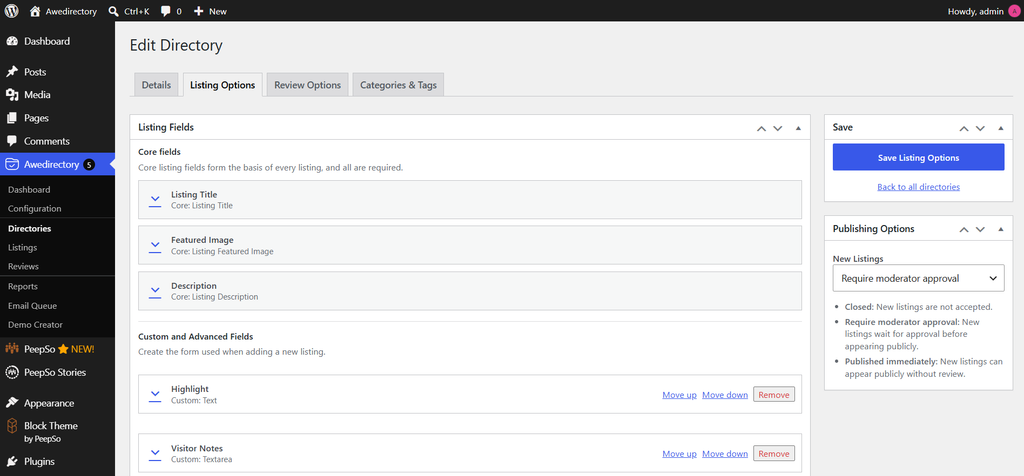
Listings start with the three you’d expect, a title, featured image, description, and you add whatever your directory actually needs on top: text, longer text, dropdowns, checkboxes, radio buttons and dates. Reviews get their own separate set of fields, configured the same way.
All fields have the plain-language behaviour settings:
- Must be filled in: Must complete this field before submitting a listing.
- Include in keyword search: Values entered in this field can help visitors find matching listings.
- Let visitors filter by this: Visitors can narrow results using this field.
- Let visitors sort by this: Visitors can order results using this field.
No jargon. No “indexed,” no “queryable,” no “meta query.” Every setting tells you what your visitors will experience, which means you can hand the directory setup to a marketing coordinator without a training session.
And awedirectory only offers you the settings that make sense for the field you’re building. You can let visitors filter by a dropdown, because that’s genuinely useful. You won’t be offered sorting on a checkbox, because sorted checkbox results look broken to a visitor and nobody wants to discover that after launch. You can’t accidentally configure a directory into producing nonsense.
Advanced fields
Some information doesn’t fit in a text box.
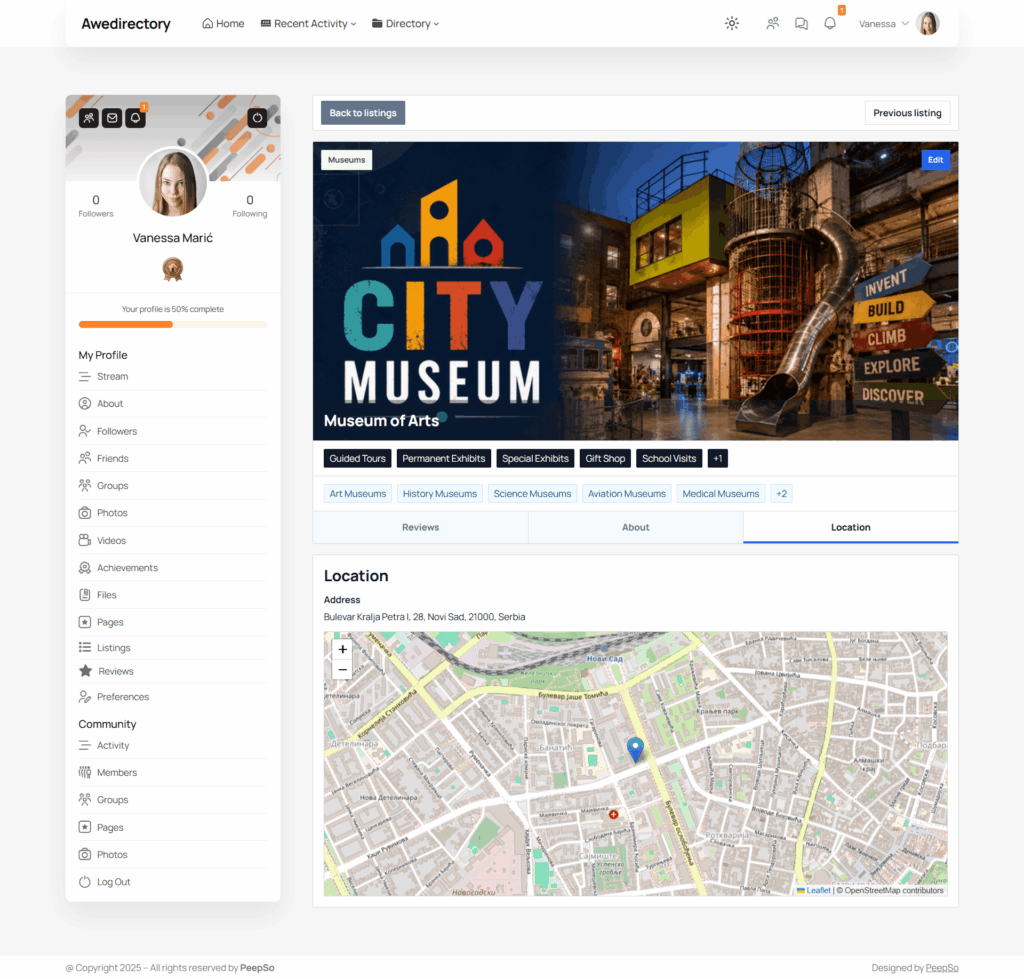
Address is a field of its own. Add it to a directory and your listings get a proper structured location, which means visitors can narrow results by location, and your listings can appear on a map, from one field you added in ten seconds. You don’t build an address out of six separate text fields and hope people fill them in consistently. It behaves like a single field everywhere you touch it: one thing to add, one thing to make required, one thing to let visitors filter by. All the structure is handled for you, underneath.
Ratings
Reviews come with a rating, and the rating is yours to shape per directory.
Pick stars, harts or percentages. Pick the maximum, anywhere from 2 to 10, so a three-heart scale and a ten-point scale are both first-class. Pick the step: whole points, halves, or tenths if your community really is that precise.
Or switch to percentage and score out of 100 instead. When you do, awedirectory hides the icon and maximum controls rather than leaving them sitting there greyed out, because neither means anything for a percentage.
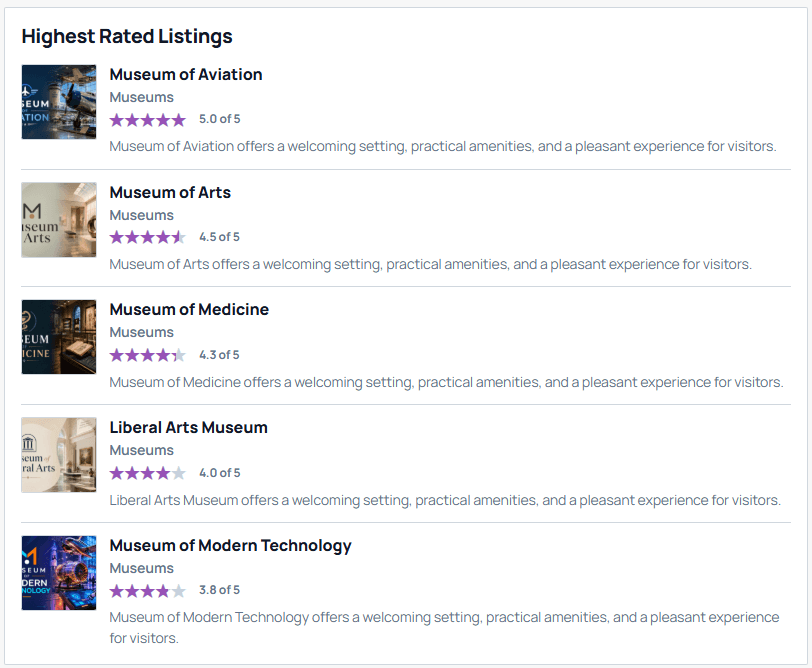
The scale always starts at 1 and you can’t invent ranges like “6 to 14” which is a small guardrail that preserves consistency. Ratings then feed straight into a Highest Rated Listings block, so reader scores turn into a page worth visiting rather than a number sitting on a detail page.
Taxonomies
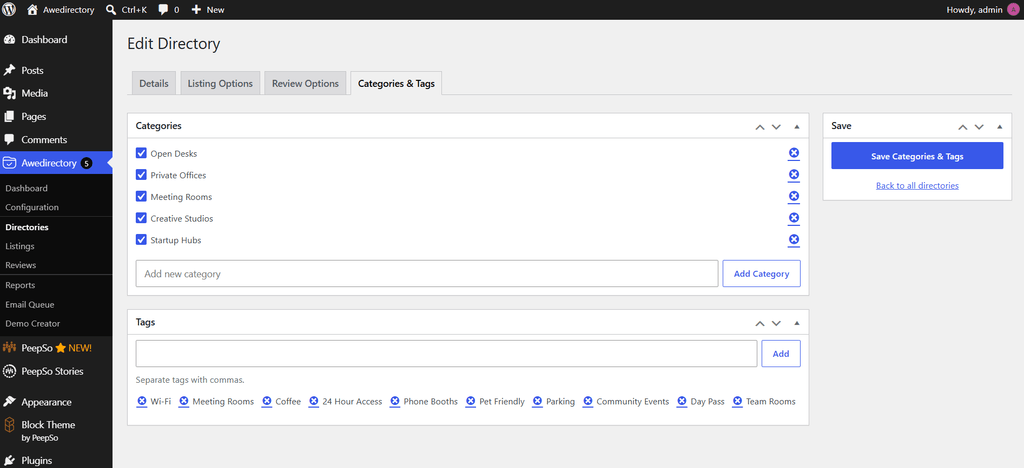
Categories and tags in awedirectory belong to the directory, not to the whole site.
This sounds limiting until you run two directories. Your Restaurants directory has restaurant categories. Your Partners directory has partner categories. They never see each other and never collide, so it can not happen that your partner dropdown filter quietly starts offering “Vegan” and “Gastropub” taxonomies.
On a network, the directory’s owner keeps control of them, and the setup screen tells you plainly which site that is, so a regional team always knows whether they’re looking at something they can change.
Search and filtering
This is what visitors actually use, and it’s where directory plugins usually disappoint.
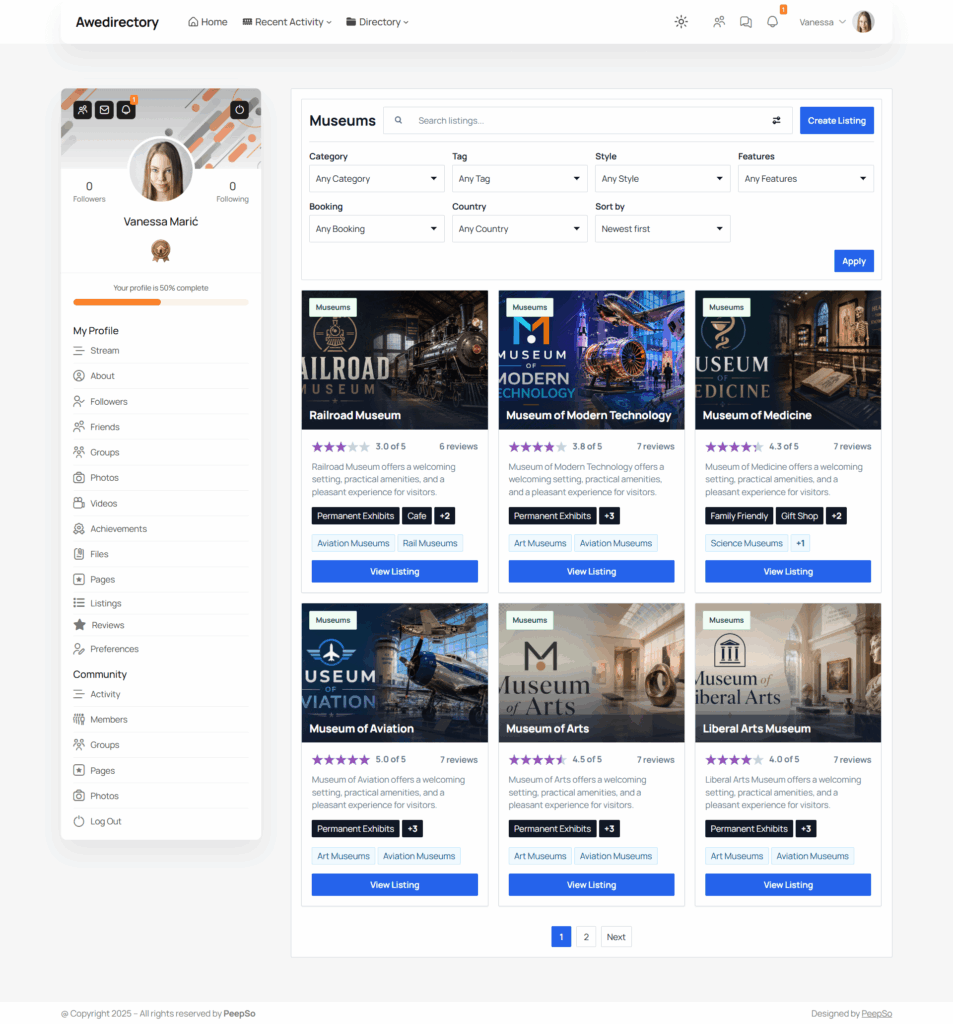
Awedirectory gives you a browsing experience that starts with the directories available on the current site, lets visitors search across them, then drops into a directory and searches the listings inside it, with category filters, tag filters, filters built from your own custom fields, sorting, and pagination.
You decide what’s filterable and sortable when you set up your fields, with the plain-language switches above. The filters your visitors see are the ones you turned on, built from your own dropdowns and choices, not a generic sidebar you have to style into submission.
It stays fast because of the choices made under the hood, and it stays correct because filters are checked against what the directory actually offers. The practical result: a visitor with four filters applied and a search term typed in gets the right listings, quickly, on a directory with thousands of entries.
Versioning
This is the feature nobody asks for and everybody needs. Here’s the problem it solves.
A listing is live and approved. Its owner signs in and edits it. New phone number, rewritten description, and while they’re there, something that really should be looked at before it goes public. Your directory requires approval for changes.
In a normal directory plugin you now have two bad options: publish the edit immediately and hope, or pull the whole listing offline until a moderator gets to it. The first one puts unapproved content on your site. The second one punishes a business for updating its own phone number by removing it from your directory for two days.
Awedirectory keeps the approved version live and holds the edit behind it. The listing stays online, serving visitors, exactly as approved. The change waits in the queue as a new version. Approve it and the page updates. Reject it and the live listing was never touched. Nobody disappeared, nobody lost their work, and nothing unapproved was ever public.
It also means nobody overwrites anybody. If a moderator approves a change while the owner still has the edit form open in another tab, that stale form is rejected instead of silently wiping out a decision that’s already been made. The same protection covers directories and reviews.
Moderation
Moderation is rarely anyone’s full-time job. It’s twenty minutes on a Tuesday, between other things. Awedirectory is built around that.
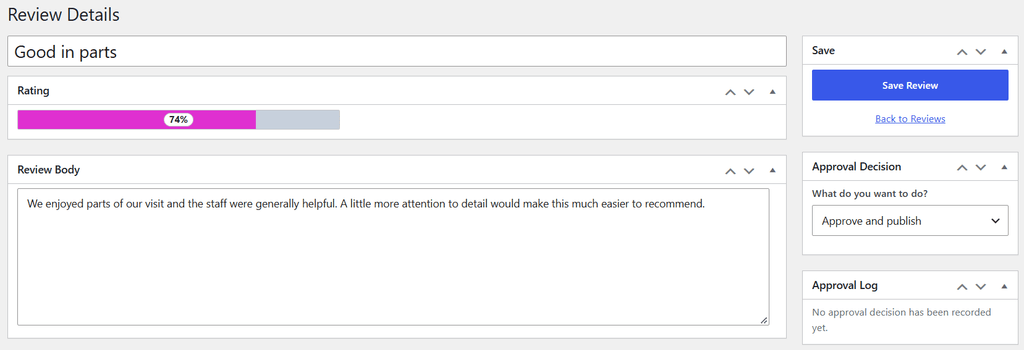
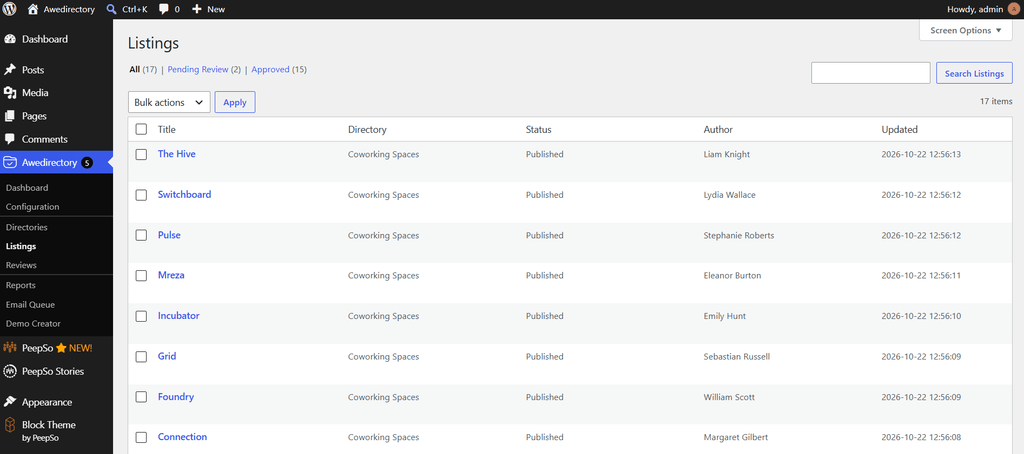
Listings and reviews each get a native WordPress list screen, the same one you already use for posts, pages… Search, status views, filter by directory, filter by status, row actions, bulk actions, trash, restore, delete, pagination, proper empty states. No custom dashboard, no app to learn. Hand it to someone and if they ever used WordPress, they already know how it works.
You get the full set of actions: submit, approve, reject, request changes, hide from the front end, restore, trash and delete. And there’s a quiet feature you’ll be grateful for in a month or two: when a moderator opens something to work on it, they can hold it. While they do, the author can’t save changes underneath them and a second moderator can’t overwrite their decision. If two people have ever worked the same queue at the same time, you know exactly what that prevents.
Maps
Add an address field and your listings can appear on a map. That’s the whole setup.
Choose your map provider per site: OpenStreetMap, Google, or none. Choose your address lookup provider separately: OpenStreetMap, Google, or none. Render with OpenStreetMap and look addresses up with Google if that’s the balance of cost and accuracy you want. Or skip maps entirely and run a directory without them.
Lookups are cached, including the failures. A badly typed address doesn’t hit your provider again on every single page load. If you’ve ever had a surprise geocoding bill, that sentence is for you. And when no provider is configured, listings still look right. No empty grey box, no broken layout, no gap where a map was meant to be. Maps being off is a supported state.
Reporting
Every public directory eventually gets content that shouldn’t be there. The question is whether you hear about it from a visitor or from your legal team.
Awedirectory lets signed-in visitors report a listing or a review from the front end, in a couple of clicks, with a reason and an optional message.
Reporting is for signed-in users only. Anonymous reporting is just a way for one annoyed stranger to flood your moderators. People can’t report their own content, and a second report of the same thing by the same person doesn’t create a second row in your queue.
Reports land on their own admin screen with pending, closed and trash views, and the actions are gated on where the report actually stands, so nothing gets handled twice. From there you can dismiss it, unpublish the reported content, trash it or remove it.
On a network, report moderation follows the same ownership rules as everything else: a site can only act on reports it’s been given authority over.
And when you make a decision, the person who reported it hears back via notifications. A reporting feature that never replies trains your community to stop reporting.
Emails
Awedirectory creates its own email. No extra plugin, no integration, no template hunting.
Mail goes out through an internal queue, and the queue has its own admin screen so you can actually see it: what’s waiting, what failed. When somebody says “I never got the email” you can look, which is not something you can usually do.
The queue also protects you from the two classic email disasters. Messages can’t be sent twice when an event fires twice or a retry kicks in. And a backlog is worked through in controlled batches, so you never get the scenario where one page load tries to send four thousand emails.
The notification events that can send mail are the ones that matter to a directory: a listing published, a review published, changes requested on a submission, a new review on your listing, content reported, and a decision made on a report you filed.
Notifications
Email isn’t the only channel, and not everyone wants email.
Every notification event can also arrive as an on-site notification, waiting in the user’s dashboard inbox next to their listings and reviews, or PeepSo if you use PeepSo integration (more on that later). People who live in your community see it where they already are, without another email to ignore.
You set the defaults for your site. Then users can override them for themselves, event by event, channel by channel. Someone can keep the on-site notification for new reviews and turn off the email. Someone else can do the opposite. The result is that your most engaged members don’t mute everything because of one noisy event.
Notifications are also aware of who should actually receive them. Listing owners hear about their own listings. Reporters hear about their own reports. Moderators hear about things they have authority over, and people who aren’t moderators never see moderator notifications, or the preferences for them.
On a network, that awareness extends across sites, so a regional coordinator isn’t emailed about reported content on a directory they have nothing to do with.
Front-end submission
Your directory grows when other people fill it in.
Awedirectory gives signed-in visitors a complete front-end flow for creating a listing. A stepped form, so creating the listing doesn’t present itself as a wall of inputs, with your required fields enforced and a featured image uploaded right there in the form.
They can come back later and edit it from the front end too, at the listing’s own URL. Their image isn’t silently wiped because they resubmitted the form. Their work isn’t lost because a moderator was looking at it. They don’t need access to your admin area, and you don’t need to copy anything by hand.
You decide what happens on submit, per directory: publish immediately, or hold for approval. Open submission suits a community directory where the point is momentum. Approval suits a member directory where the point is standards. And if the person submitting is actually one of your moderators, the plugin knows, and doesn’t make them queue their own work.
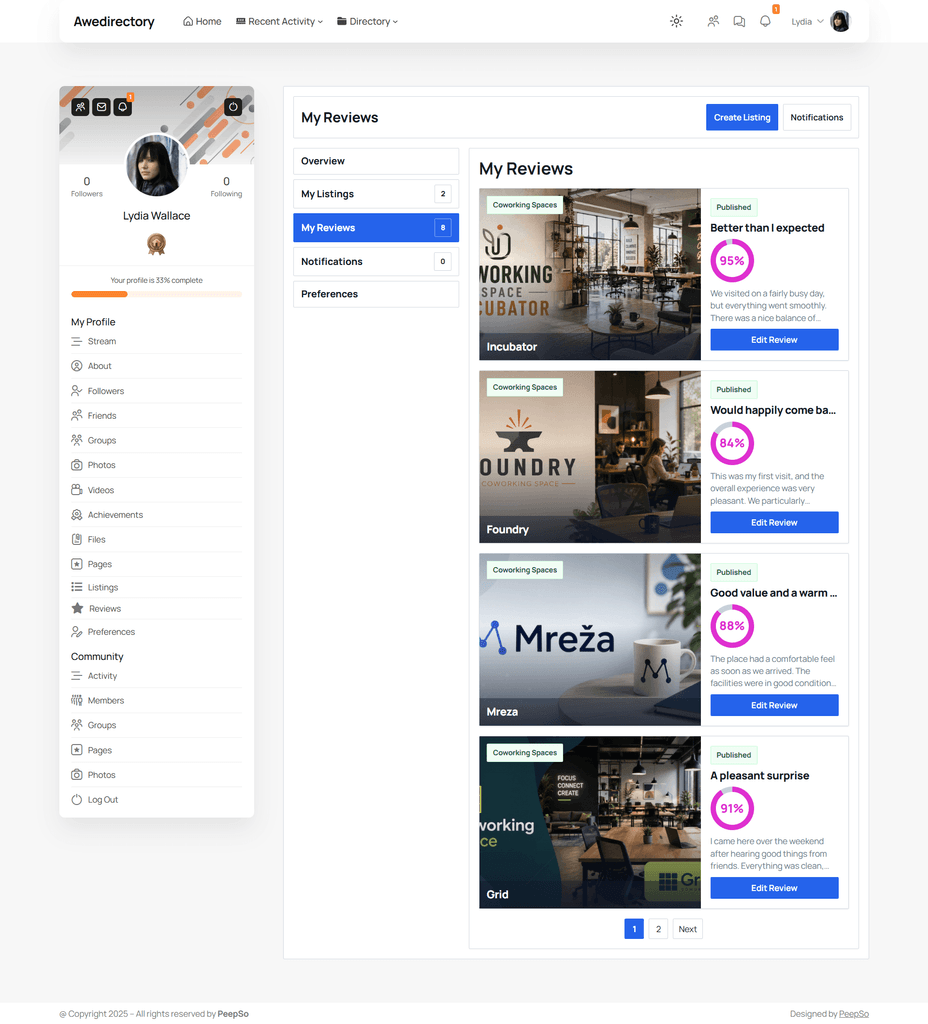
Then there’s the user dashboard, a block you drop on a page that gives every signed-in member their own listings, their own reviews, their own notification inbox and their own notification preferences in one place. That’s the piece that turns submitters into people who maintain their listings themselves, which is the cheapest moderation there is.
Blocks
Awedirectory is built for the block editor, so putting a directory on a page is drag, drop, done.
Eight included blocks are
- Directories: the main browsing experience, with search, filters, sorting and pagination
- Search: a focused search entry point, with your own title and placeholder text
- Listing Editor: the create and edit listing flow
- Listings and Reviews: listings and reviews from the directories you choose
- User Dashboard: the signed-in member’s own space
- Recent Content: recent listings or reviews, for a homepage or sidebar
- Highest Rated Listings: your best-reviewed listings, ranked
- Directory Stats: public activity numbers
Several of them ship with Panel and Simple styles, so the same block can be a bordered module in a sidebar or clean content in a page, without writing a line of CSS.
And on activation, awedirectory sets up your starting pages for you. A Directory page and a Dashboard page, with the right blocks already on them. You’re not staring at a blank screen wondering which block goes where.
Clean URLs
Your listings get real URLs:
- example.com/directory/restaurants/
- example.com/directory/restaurants/cafe-moreau/
- example.com/directory/create-listing/
Readable, shareable, properly indexable. Not a query string with an ID in it, and not a URL that depends on keeping one particular page alive with one particular block on it.
You set the base under Settings -> Permalinks, where WordPress already keeps URL language. The default is directory. Change it to guide, members, annuaire, whatever your site calls it, and the links update on their own.
On a network, each participating site can use its own word for the same shared directory.
And URLs that shouldn’t exist, don’t. A listing that isn’t approved and published, or a directory a site hasn’t enabled, gives a normal not-found page, not an error that confirms there’s something there. Nobody gets to go fishing through your pending submissions by guessing URLs.
PeepSo and Block Theme integration.
If you run a PeepSo community, your directory doesn’t have to sit beside it like a separate sore thumb. PeepSo – awedirectory integration wires the two together properly, and it’s delivered as part of PeepSo’s latest 9.1.0.0 update.
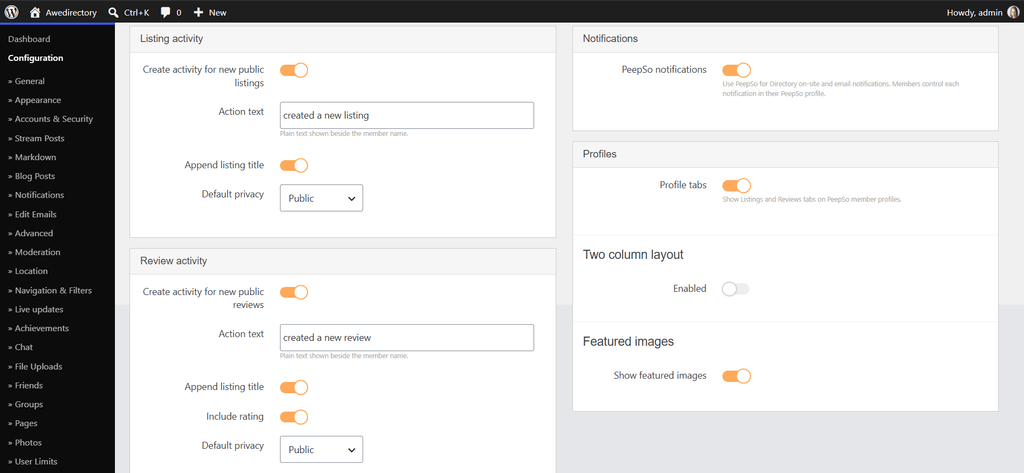
Install awedirectory, install PeepSo, activate the integration, and everything below is configured from a single screen at PeepSo -> Configuration -> Directory.
Your directory shows up in the activity stream
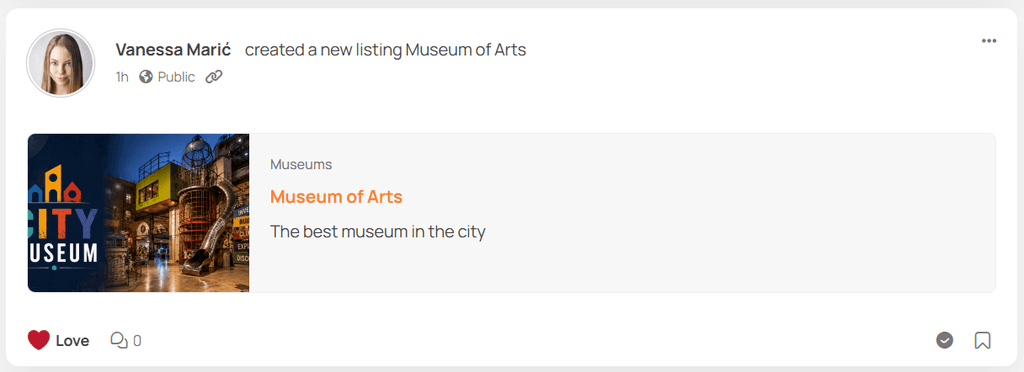
When a member publishes a listing, it posts to the activity stream. When a member publishes a review, that posts too. Not as a bare link, as a rich card, with the content presented the way your members expect everything else in the stream to look. You control the wording. The action text beside the member’s name defaults to created a new listing and created a new review, and you can change both to whatever suits your community’s voice. You can append the listing title to the action text, and for reviews you can include the rating right there in the stream.
Directory activities are read-only. They represent real content that lives in your directory, so they aren’t editable posts, but they keep likes and reactions. Your members can respond to a new listing the same way they respond to anything else, which is the entire point of putting it in the stream.
You also set the default privacy for these activities, choosing from the same privacy levels PeepSo already gives the rest of your community.
Listings and Reviews on every member profile
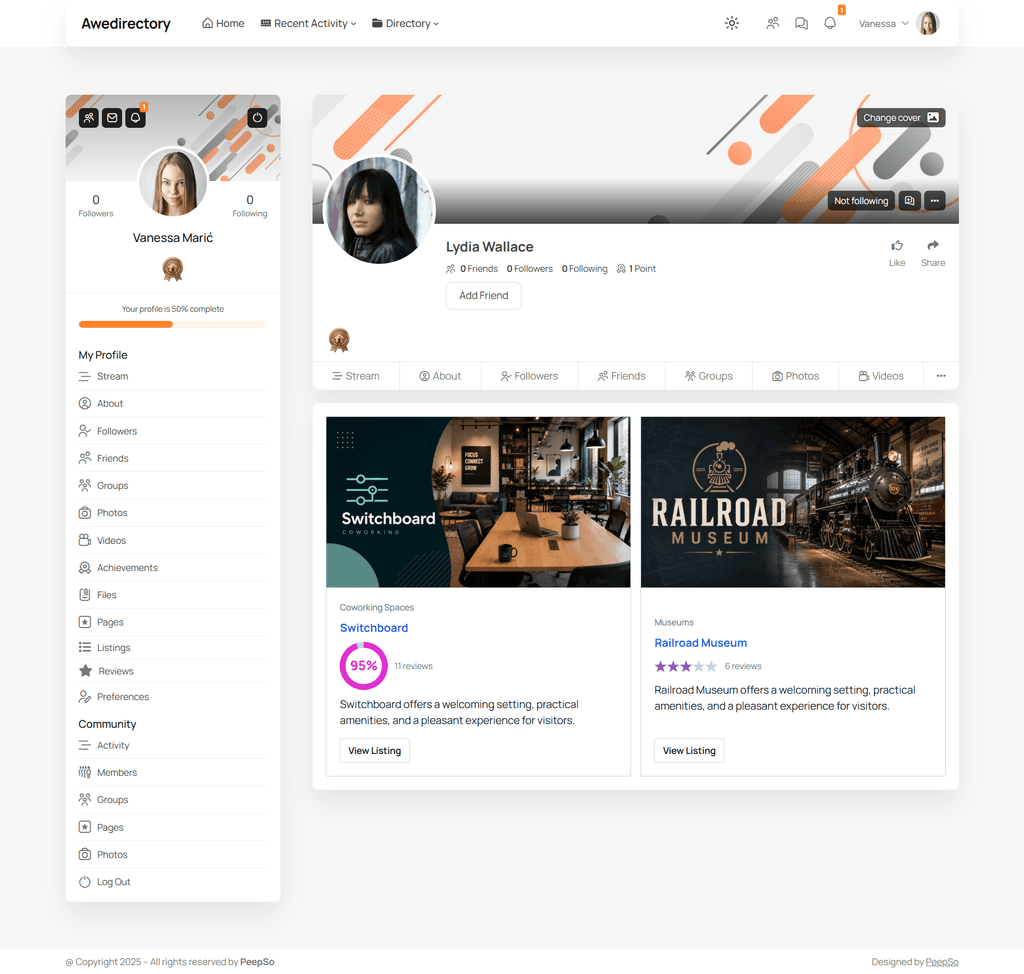
Member profiles get Listings and Reviews tabs, showing what that person has contributed to your directories, in rich cards built to look like PeepSo.
You decide whether featured images appear, and whether the cards sit in a single or two-column layout. Turn either tab on or off as you like.
And it works in the other direction too: review authors on your public directory pages link to their PeepSo profiles. Someone reads a review they find helpful, clicks the name, and lands in your community looking at a real member, which is exactly the journey you want and the one that normally never happens when a directory and a community are two separate systems.
Notifications through PeepSo, controlled by your members
Every awedirectory notification event can be delivered by PeepSo instead, through the on-site and email notifications your members already use. All eight of them: a listing ready for approval, a review ready for approval, reported content, a listing published, a review published, changes requested, a new review on your listing, and a decision on a report you filed.
They arrive in a Directory group in each member’s own PeepSo notification preferences, so people switch individual notifications on and off in the same place they manage everything else. No second preferences screen somewhere else in the site, no member wondering why directory email behaves differently from community email.
Theme styling, with or without PeepSo
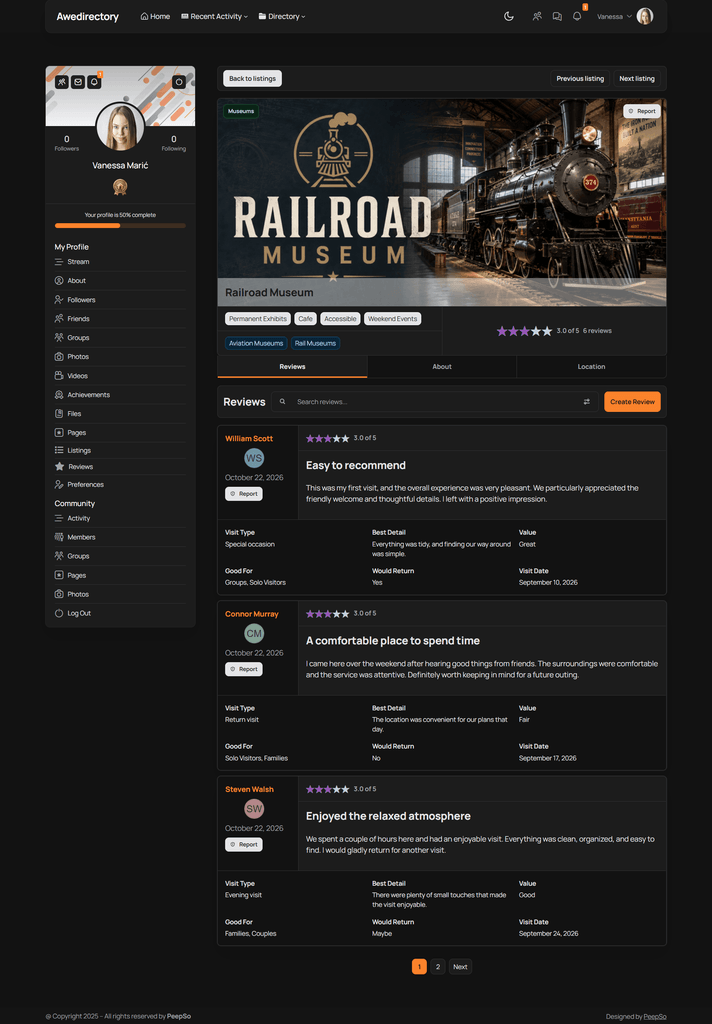
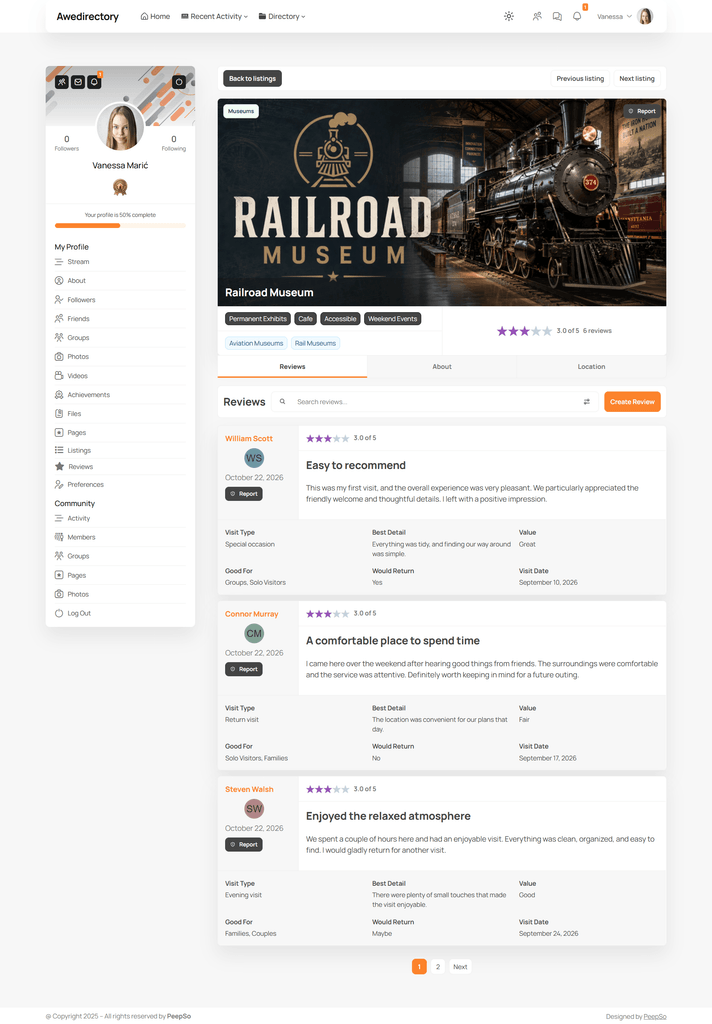
The integration’s activity cards and profile cards pick up PeepSo Block Theme Custom Preset values automatically, so they match the theme you’ve chosen without touching CSS. Your theme settings, brand colors and design stay yours. Awedirectory respects and follows it. Your directory pages take the theme’s palette and backgrounds, panels sit at the right depth against the page rather than painting flat rectangles over it, and when a visitor uses the theme’s own light/dark switch, awedirectory follows them live, no reload, no second switch to find, no corner of the site still glowing white at midnight.
Licensing is PeepSo’s
The integration ships as part of PeepSo and behaves like every other PeepSo plugin: PeepSo licensing, PeepSo updates, PeepSo’s version lock. It registers on the PeepSo license screen, and there’s nothing separate to buy, renew or keep track of. It needs awedirectory 1.0.0 or newer alongside it.
A note on scope
The integration is for single-site WordPress, and that’s a deliberate rather than an unfinished feature.
PeepSo is one community: one activity stream, one profile per member. That’s the right design for a community, and it’s why PeepSo communities feel coherent. Awedirectory works the other way around. A directory can be owned by one site and displayed on several others, and a listing can arrive from a site that doesn’t own it.
Put those two models together across a network and both plugins start disagreeing how some “hard” questions will be answered. Which site’s activity stream does a cross-site listing belong in? Which profile owns a review written on another site? Rather than guess at answers like that, the integration stays where both products are completely unambiguous: one site, one community, one set of directories. Activation is refused on a multisite install rather than half-working on one.
Awedirectory itself is unaffected either way. Run it across forty sites and every feature works exactly as described. Awedirectory does its own cross-site bookkeeping, so when a member on Site A adds a listing to a directory owned by Site B and someone on Site C reviews it, awedirectory already knows precisely who to notify and where. The PeepSo integration is what you add when your directory and your community live together on one site, and that’s a very common and very good place for them to be.
Theme Compatibility
Awedirectory works on Block, classic or hybrid themes, and renders identically on all. Search, filters, sorting, the stepped submission form and the rating input all behave the same way, whichever theme your site is built on. If you’re on a classic theme because your site has been running happily for eight years and nothing’s broken, awedirectory isn’t going to be the reason you rebuild it.
Ready when you are
Awedirectory is a complete directory platform that behaves like WordPress, respects your theme, validates what your visitors submit, keeps unapproved content off your site, and scales from one site to an entire network without you rebuilding anything along the way.
It needs PHP 8.2 and WordPress 7.0 or newer.
One more thing worth saying out loud, because the industry has trained you to expect the opposite: When you purchase the license, it activates on entire network, or single site and if your licence lapses, nothing switches off. You’ll get a notice in the admin telling you to renew for updates and support. Your directories keep working, your listings stay visible, your forms keep accepting submissions.
Build the directory you actually wanted.



Reactions & comments
Comments