

Just a few weeks ago, we shipped a major PeepSo release. Naturally, we looked at that and thought: “Yes, but what if we did another massive one?” PeepSo 9.0.2.0 is now available, and despite the polite-looking version number, this is a substantial update. It introduces powerful new functionality for Pages, a big round of upgrades for Stories, important fixes across PeepSo and integrations, visual improvements, and even an AI-assisted translation proof of concept.
There is a lot in this release, so let’s get into it.
Pages Can Now Author Blog Posts and Announcements
One of the headline features in PeepSo 9.0.2.0 is a major upgrade for Pages: Pages can now be assigned as the owner or author of blog posts. This is especially useful for communities where not every piece of content should come from a personal user profile.
Until now, WordPress blog posts were typically tied to individual users. That works well for personal blogs, contributor posts, and member-generated content, but community websites often need something more flexible.
Sometimes a post should come from a brand, not Bob from accounting.
Sometimes an announcement should come from a school, organization, department, club, ministry, company, team, official project, or community Page.
Now it can.
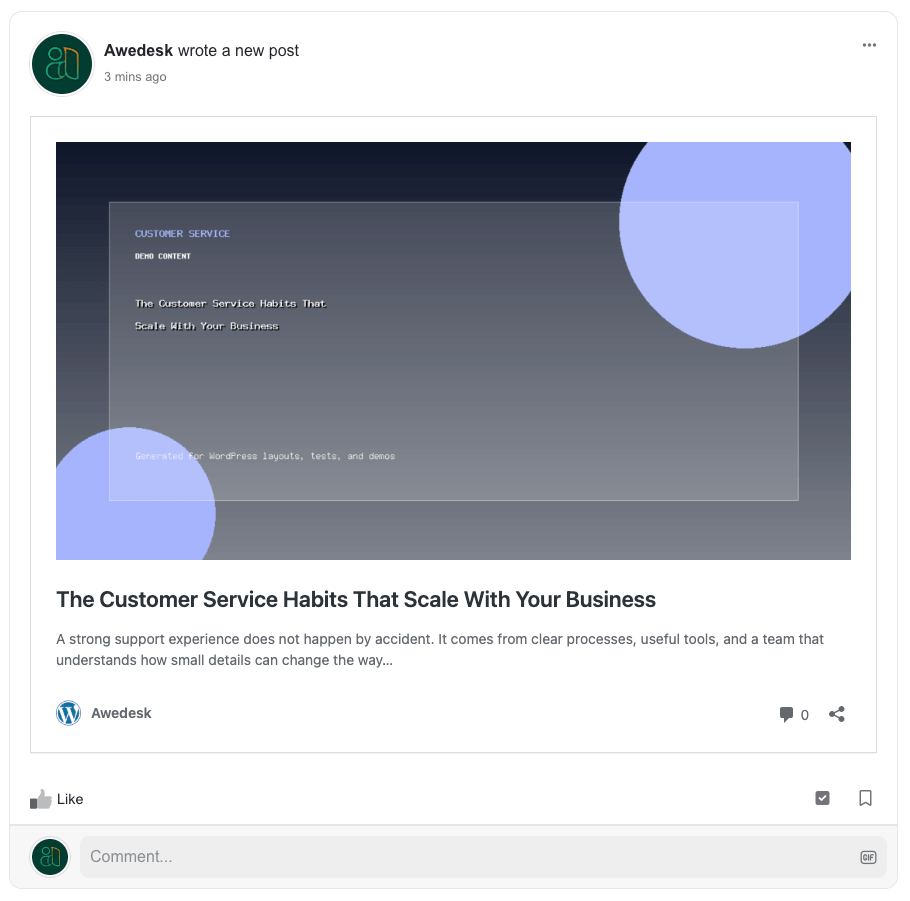
With PeepSo 9.0.2.0, Pages can become the visible identity behind blog posts and announcements. That means your community can publish content under the name of the relevant Page, giving it a clearer and more official voice.
For example, you can publish posts as:
- a company Page announcing product updates
- a school Page posting news for students and parents
- a club Page sharing event updates
- a nonprofit Page publishing campaign announcements
- a brand Page posting official statements
- a department Page sharing internal updates
- a community Page publishing weekly news
This makes content feel much more natural inside larger communities. Instead of forcing everything through individual user accounts, your site can now better reflect how organizations actually communicate.
Very civilized. Very grown-up. Very “we do not need to pretend Dave personally wrote every official announcement anymore.”
The WordPress post still belongs to the real user for editing, permissions, revisions, REST/API ownership, and audit history. The Page attribution is stored separately and only affects public presentation and the related PeepSo activity stream post. In the post view, comments you will also see Page information as the author. If you deactivate or remove PeepSo Pages plugin, don’t worry, the post ownership is covered.
Batch Reassign Existing Blog Posts to Pages
We also added backend tools that allow administrators to batch reassign existing blog posts so that a Page becomes the new owner or author.
This is a big deal for established communities.
Many sites already have years of blog posts, announcements, updates, and news articles that were originally published under admin accounts or individual team members. With this update, you can clean that up and move older content under the correct Page identity.
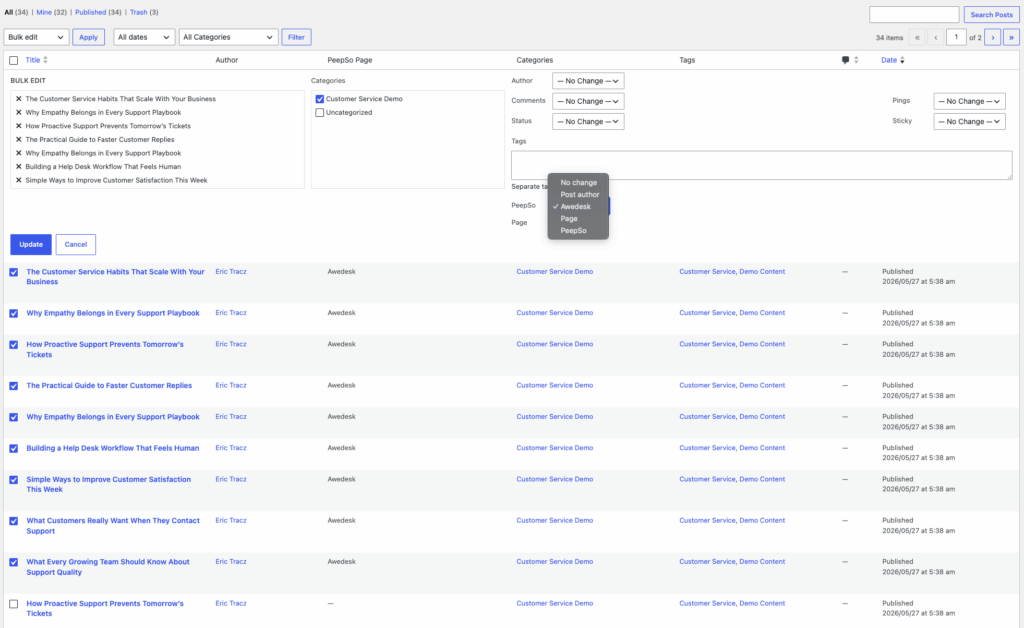
For example, you might have older posts published by an admin account, now those posts can be reassigned to a proper Page.
This helps make older content more consistent, more professional, and easier for members to understand. It also solves one of those awkward community website problems where official posts accidentally look like personal posts from whoever happened to click “Publish” that day. Because let’s be honest: sometimes “posted by Steve” is not the institutional gravitas your announcement was hoping for.
Stories Got a Huge Upgrade
Stories also received a major round of new features, improvements, and fixes in PeepSo 9.0.2.0. This is one of the biggest updates to PeepSo Stories so far, with more control over appearance, behavior, media handling, and backend management. The new Stories features include:
- a new slide time limit setting
- an option to limit uploaded photo image size
- dark mode support
- a new rounded visual style
- improved support for primary colors
- better behavior on larger screens
- improved media display so images and videos can better fill the available view
Stories should now feel smoother, more modern, and better aligned with your site’s design.
Better Stories Management in the Backend
Administrators also get a nicer Stories management experience.
PeepSo 9.0.2.0 adds a large image preview for Story items in the backend, making it much easier to review content at a glance. We also fixed issues where administrators could not properly add or delete photos or videos while editing a Story from the backend.
That may sound small, but anyone who manages media-heavy community content knows that backend previews are not a luxury. They are the difference between “I know exactly what I am editing” and “I am clicking mysterious thumbnails in the fog of war.”
Important: Stories Shortcode Has Changed
This release includes an important change: the Stories shortcode has been renamed. If your site uses the old Stories shortcode directly inside posts, pages, widgets, builders, templates, or custom layouts, you will need to update it after upgrading to PeepSo 9.0.2.0.
Please replace:
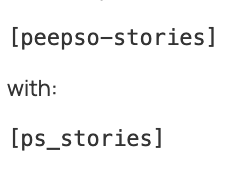
This is especially important for sites that manually embedded Stories outside of the default PeepSo layout. The old shortcode name may no longer work as expected after the update, so we strongly recommend checking any custom pages, landing pages, widgets, theme templates, and page builder layouts where Stories were manually inserted.
This is the one item in the release where we are waving the little red flag on purpose. Not a panic flag. More of a “please update this before asking why the magic box is no longer magic” flag.
Indonesian Translation: AI-Assisted Proof of Concept
PeepSo 9.0.2.0 also includes an Indonesian translation for the PeepSo foundation.
This translation was created as an AI-assisted proof of concept. The interesting part is not simply “AI translated text,” because at this point that alone is not exactly science fiction anymore.
The interesting part is that AI can now view and interact with a real website, log in as a user, see strings in context, and help translate the interface with a better understanding of where and how the text appears.
That matters because software translation is not just about words. It is about context.
A phrase that looks perfectly fine in a translation spreadsheet can feel completely wrong inside a button, notification, profile field, modal, or settings panel. Context-aware translation helps close that gap, and this Indonesian translation is our first step in exploring that workflow.
As always with translations, community feedback is welcome. AI can move fast, but real users in real communities are still the final boss. We’ll give it some time, gather feedback and when we are confident, we’ll push translations for other languages for entire PeepSo plugins suite.
PeepSo Core Improvements
Beyond the headline features, PeepSo 9.0.2.0 includes several improvements across the core plugin. The new postbox configuration is no longer marked as BETA, and administrators can now configure the “What is on your mind?” text. As always, this can also be changed through language overrides for sites that want a more customized tone.
We also improved stream behavior for guests. Some activity stream filters and search options can now be available to logged-out visitors, which helps make public communities easier to explore.
Other improvements include:
- hashtag dropdown support in the postbox
- hiding the activity stream filter when there are no activities
- improved select field styling on the profile fields management page
- a simplified “please login” layout
- reorganized internal admin menu calls
In plain English: PeepSo should feel a little cleaner, a little smarter, and a little less likely to show unnecessary UI when there is nothing useful to show. Which, honestly, is a good life philosophy too.
Awedesk Integration: VIP Icons in the Sidebar
For sites using the Awedesk integration, PeepSo VIP icons can now be displayed in the Awedesk right sidebar next to the client name. This makes it easier for support agents to immediately identify VIP users while handling tickets or conversations.
It is a small visual detail, but it can be very useful in real support workflows where context matters and nobody wants to click through three screens just to understand who they are talking to.
Fixes and Compatibility Updates
As usual, this release also includes a long list of fixes. We addressed visual issues in the PeepSo dashboard, fixed styling problems with Stories when using Gecko, and resolved a Stories issue where the shortcode could unexpectedly affect the site title.
Several Stories display and usability issues were also fixed, including overlapping buttons, avatar and name handling, primary color support, and layout behavior on larger screens.
Other notable fixes include:
- chat images sometimes missing from new messages or replies
- avatar and username links not redirecting correctly on mobile
- JavaScript conflict with Divi on the members page
- Advanced Ads layout issue when using AdSense with content placement
- profile cover rotation issues related to user limits
- duplicate Social Invitation Block removal
- popup modal behavior issues
- group owners and managers now being able to pin posts from the new postbox
- WPAdverts integration no longer preventing pending posts or comments from showing to admins
- Anonymous user avatar syncing between postbox, stream, and profile
- invalid character counts in profile fields using non-alphanumeric characters
That is a lot of fixes. The changelog had coffee. Possibly several.
Update Recommended
PeepSo 9.0.2.0 is a substantial release with new features, important improvements, and plenty of polishing across the platform. See the full changelog here.
The biggest things to check after updating are:
- If you use Stories shortcodes manually, update them to the new shortcode.
- If your site uses Pages heavily, try the new blog post ownership and batch reassignment tools.
- If you publish announcements, news, or official updates, consider moving that content under the correct Page identity.
- If you use Stories, review the new display, timing, image size, dark mode, and style options.
- If you use integrations like Awedesk, Advanced Ads, WPAdverts, Social Login and Invitations, or Groups, this release includes fixes and improvements worth having.
As always, we recommend testing major updates on a staging site first, especially if your community uses custom templates, page builders, or heavily customized layouts. PeepSo 9.0.2.0 is available now.
And yes, we know: another big release already. We apparently have a problem. A productive one.


Reactions & comments
Comments