
Building a social network website sounds like a huge project until you break it into the right pieces. Most site owners do not actually need to build the next Facebook. They need a focused community where members can create profiles, join groups, post updates, send messages, and stay engaged around a shared interest, brand, course, or membership. That is where WordPress becomes especially useful. Instead of paying for a closed platform that controls your branding, member data, and business model, you can build your own social network on infrastructure you fully own. You choose the design, the features, the monetization, and the member experience.
The challenge is not whether WordPress can do it. The challenge is building a social network website that feels structured, active, and easy to use from day one.
With PeepSo, you can turn a standard WordPress site into a true social community with activity streams, member profiles, groups, pages, media sharing, notifications, and private messaging. That gives creators, membership site owners, educators, and entrepreneurs a practical way to launch a branded social platform without building custom software.
Why build a social network on WordPress instead of a hosted platform
A lot of creators start with Facebook Groups, Discord, Circle, or Mighty Networks because setup looks simple.
The downside shows up later. Branding is limited. Member experience depends on someone else’s platform rules. Important updates compete with everything else happening on the platform. Monetization and integrations are often restricted. Moving later can be painful.
WordPress gives you a different path.
You own the website, the content, the member relationships, and the business model. You can connect your community to your courses, store, events, memberships, and email marketing stack. That creates a much stronger long-term asset than a community that lives on rented land.
For site owners who already run WordPress, the benefits are even bigger. You do not need to manage separate systems for your content site and your community. You can build both in one place.
PeepSo makes that practical because it adds the social layer WordPress is missing out of the box.
What a successful WordPress social network needs
A social network website is more than user registration.
Members need a reason to return, a place to interact, and simple tools that help conversations keep moving. That usually means a personal profile, a shared activity area, interest-based groups, direct communication, notifications, and media support.
It also needs structure behind the scenes. You need privacy controls, moderation, navigation, onboarding, and a clear purpose for the community.
That is why the best WordPress social networks are built around use cases, not just features. A course creator may want private groups for students, profile-based networking, and activity around lessons. A membership business may need paid access, member directories, messaging, and exclusive pages. An ecommerce brand may want product discussion, customer groups, and a community layer connected to WooCommerce. A niche publisher may want profile-driven discussion that keeps readers on the site longer and creates user-generated content.
With PeepSo, those use cases can live inside one WordPress install instead of being split across disconnected tools.
Step 1: Start with the right WordPress foundation
Before adding community features, make sure the core website is ready.
Your hosting matters more than many people expect. A social network website generates repeated activity from logged-in members, notifications, profile views, messaging, and media uploads. That creates a different workload than a brochure site.
Choose hosting that can handle logged-in traffic well. Use solid caching where appropriate, but remember that community pages are often dynamic and personalized. Keep WordPress, PHP, and your plugins updated. Use reliable backup and security tools from the beginning.
Your theme also matters.
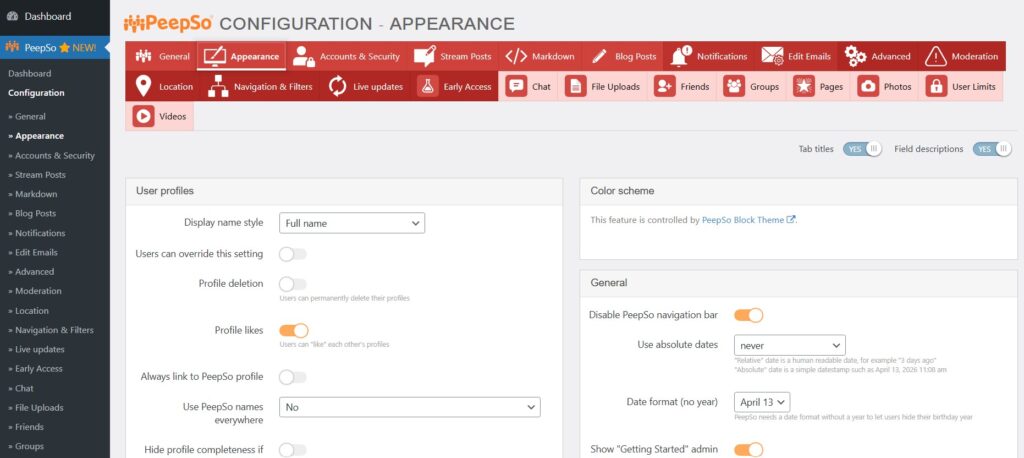
PeepSo comes with modern Block Theme but you can always pick a responsive WordPress theme that gives you clean typography, good spacing, and strong mobile usability. Community sites are used heavily on phones, so navigation and posting flows need to feel simple on smaller screens.
At this stage, keep the stack lean. Too many plugins create conflicts and slow the experience. Start with essentials, then add only the tools that support your community model.
Step 2: Install PeepSo and create the social layer
Once WordPress is ready, the next move is adding the social network functionality itself.
This is where PeepSo becomes the core of the build.
After installation, you can create a member-driven environment where users have their own profiles, can share updates in an activity stream, interact in groups, upload media, receive notifications, and communicate privately. That instantly shifts your site from a content destination into a community platform.
Instead of stitching together separate profile, messaging, and community plugins, PeepSo gives you a more unified structure. That matters because fragmented community setups often feel inconsistent for members and harder to manage for site owners.
The result is a cleaner member experience. People sign up, complete a profile, explore the stream, join groups, and start connecting without feeling like they are jumping between unrelated systems.
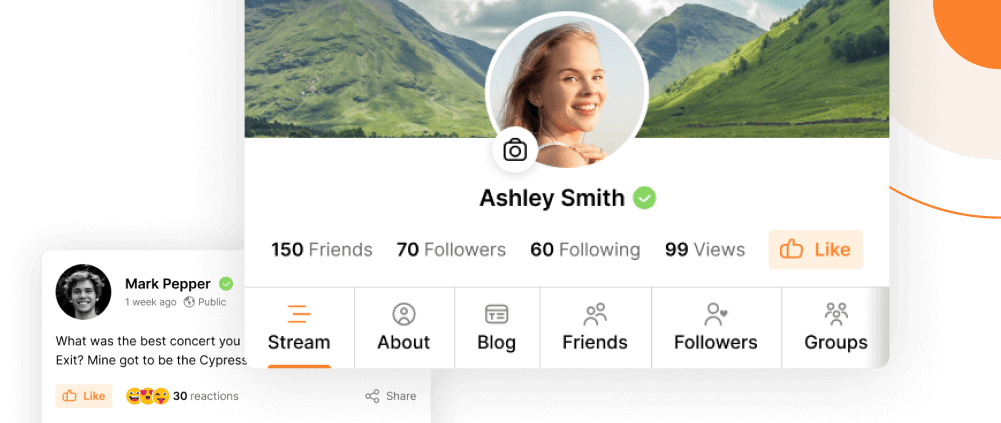
Step 3: Design the member experience around profiles and activity
A social network only works when members feel visible.
That starts with profiles.
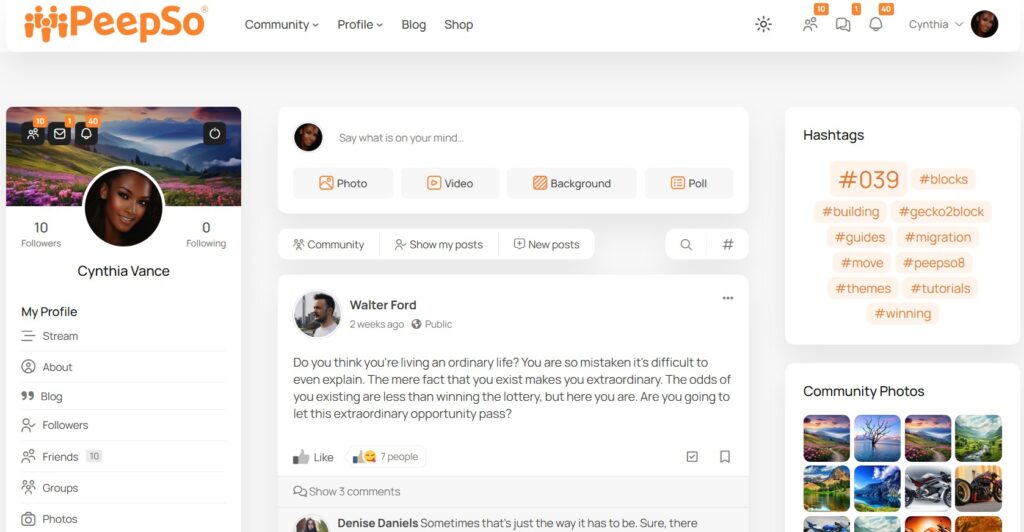
Profiles should help members introduce themselves, show who they are, and make it easy for others to connect. In many communities, profile fields become part of discovery. Members may search by profession, interest, location, expertise, course progress, or membership level.
With PeepSo, profiles become a core part of how the community works rather than an afterthought.
The next piece is the activity stream.
This is where community energy becomes visible. Members can post updates, comment, react, share media, and follow ongoing conversations. A healthy activity stream reduces the empty-room effect because people can instantly see that the site is active.
To make this work well, seed the stream early. Publish welcome posts, discussion starters and announcements. Give new members simple reasons to post. Ask them to introduce themselves. Encourage photo sharing. Start weekly conversations tied to your niche.
When the stream feels alive, retention improves.

Step 4: Organize conversations with groups and pages
A growing social network needs structure.
If every conversation happens in one stream, discovery becomes messy and engagement becomes shallow.
Groups solve that problem. They let you organize discussions around specific interests, programs, cohorts, products, regions, or membership tiers. That makes the community easier to navigate and more relevant to each member.
For example, a course business might create a group for each cohort, a coaching community might create groups for accountability circles, and a brand community might create groups for customer interests or product lines.
PeepSo groups make it easier to create these spaces inside the same platform instead of sending members to separate tools.
Pages add another useful layer. They give you a way to create dedicated branded spaces, sub-communities, or business-related hubs inside the broader network. That is especially useful when your social network supports different topics, offers, or leadership voices.
The more intentional your structure is, the easier it becomes for members to find their people.
Step 5: Add messaging, notifications, and media to increase engagement
Community websites succeed when interaction feels immediate.
Public discussions matter, but private communication matters too. Members often want to follow up after a conversation, build relationships, ask questions privately, or continue discussions one to one.
That is why private messaging is not just a nice extra. It is part of what makes a social platform feel complete.
Notifications are equally important. They bring people back when someone replies, mentions them, invites them, or posts in a group they care about. Without a strong notification system, engagement drops because members forget to return.
Media also changes the quality of the community. Photos, videos, albums, and richer posts make the site feel more personal and dynamic. For many communities, visual sharing is what turns passive readers into active participants.
PeepSo includes these social features in a way that fits naturally into WordPress, which gives site owners a more complete community foundation from the start.
Step 6: Connect your community to the rest of your business
This is where WordPress has a major advantage over standalone community platforms.
Your social network does not need to exist as an isolated product. It can support your entire business model.
If you sell products, connect the site to WooCommerce so your store and community work together.
If you run courses, connect the experience to LearnDash or another learning plugin so discussion and learning happen inside the same ecosystem.
If you monetize with ads or sponsorships, a community setup can support that too.
If you run events, job boards, donations, or membership-driven access, WordPress gives you room to expand instead of forcing you into a fixed feature set.
PeepSo is especially strong here because it fits naturally into a broader WordPress stack. That gives creators and business owners more flexibility than platforms that try to lock everything into one closed system.
This is also the point where PeepSo becomes more than a social plugin. It becomes the member engagement layer for your whole website.
Step 7: Set privacy, moderation, and community rules early
A social network website needs clarity from the start.
Members should know what kind of behavior is expected, what content is allowed, and where to go for help. Good communities do not become healthy by accident. They are guided.
Create a clear community policy. Explain what respectful participation looks like. Decide how moderation works. Make it obvious how members can report problems.
Privacy matters too.
Some communities thrive in public. Others need private groups, controlled access, or member-only spaces. That often depends on your niche. Professional communities, coaching networks, paid memberships, and student spaces usually benefit from stronger privacy settings.
This is another reason self-hosted WordPress communities are attractive. You keep more control over how the space is structured and who gets access.

PeepSo Power Suite
Step 8: Launch with a plan, not just a plugin setup
Many WordPress community sites fail for one simple reason.
The software is installed, but the community is not designed.
A successful launch needs an onboarding path. New members should know exactly what to do first. Ask them to complete a profile, introduce themselves, join a relevant group, and respond to a simple starter discussion.
Prepare your first month of activity before launch. Create welcome content, pinned posts, recurring posts, featured discussions, and announcements. Plan how you will highlight member wins and useful conversations.
Think about the first 100 members.
What will they talk about?
What kind of content will make them return?
What small actions can you encourage every week?
The best community software cannot fix a silent launch. But when the strategy is clear, PeepSo gives you the tools to support it inside WordPress.
Common mistakes to avoid when building a WordPress social network
The first mistake is trying to launch with too many features.
Keep the first version focused. Members do not need every possible option on day one. They need a clear reason to join and an easy way to participate.
The second mistake is copying mainstream social platforms too closely.
Your community should be built around a niche outcome, not around endless generic posting. A focused network usually performs better because members know why they are there.
The third mistake is treating the community as separate from the rest of the site.
When your blog, store, courses, memberships, and community support each other, the whole business becomes stronger.
The fourth mistake is ignoring mobile usability.
A social network that feels awkward on phones will struggle no matter how good the concept is.
The fifth mistake is choosing a platform that limits future growth.
With WordPress and PeepSo, you can start lean and keep expanding without rebuilding everything on a new system later.
Why PeepSo is a strong choice for WordPress social networks
There are many tools that claim to help you build an online community.
What site owners actually need is a practical way to create a social experience on WordPress without turning the site into a patchwork of unrelated plugins.
That is where PeepSo stands out.
It gives you the core features a real social network needs, including activity streams, member profiles, groups, pages, media sharing, notifications, and messaging. It also fits naturally into WordPress, which is what makes it useful for creators, educators, membership businesses, ecommerce brands, and niche communities.
Compared with Facebook Groups or Discord, you gain more control over branding, business integration, and ownership.
Compared with closed community platforms like Mighty Networks or Circle, you get deeper WordPress flexibility and a stronger connection to the rest of your site.
Compared with older WordPress community approaches, PeepSo gives site owners a cleaner path to building a modern, social member experience.
Conclusion
If you want to build a social network website with WordPress, the smartest approach is to keep the goal focused.
Do not try to recreate every feature of a massive public social platform. Build a community that serves a specific audience and supports a clear business or membership outcome.
Start with strong WordPress hosting, a clean theme, and a clear community purpose.
Then use PeepSo to add the social features that make the site feel alive: profiles, activity streams, groups, pages, media, notifications, and private messaging.
From there, shape the experience around onboarding, moderation, content, and the integrations that matter most to your business.
That gives you something far more valuable than a borrowed audience on someone else’s platform.
It gives you a branded social network you control on WordPress.


Reactions & comments
Comments